DispHub for Samsung Smart Signage
What DispHub does
DispHub is a digital-signage service for shops and offices. The operator uploads images and videos on disphub.ro, the display plays them in a loop, offline too, and the portal shows whether the display is online and what it plays.
This app is the DispHub player for Samsung Smart Signage displays (Tizen 6.5 and newer). Images and videos are downloaded once and cached on the display; the display keeps playing when the network drops and resumes syncing when it returns.
How a display is claimed
- Install the app from the display's URL Launcher: set the URL Launcher address to
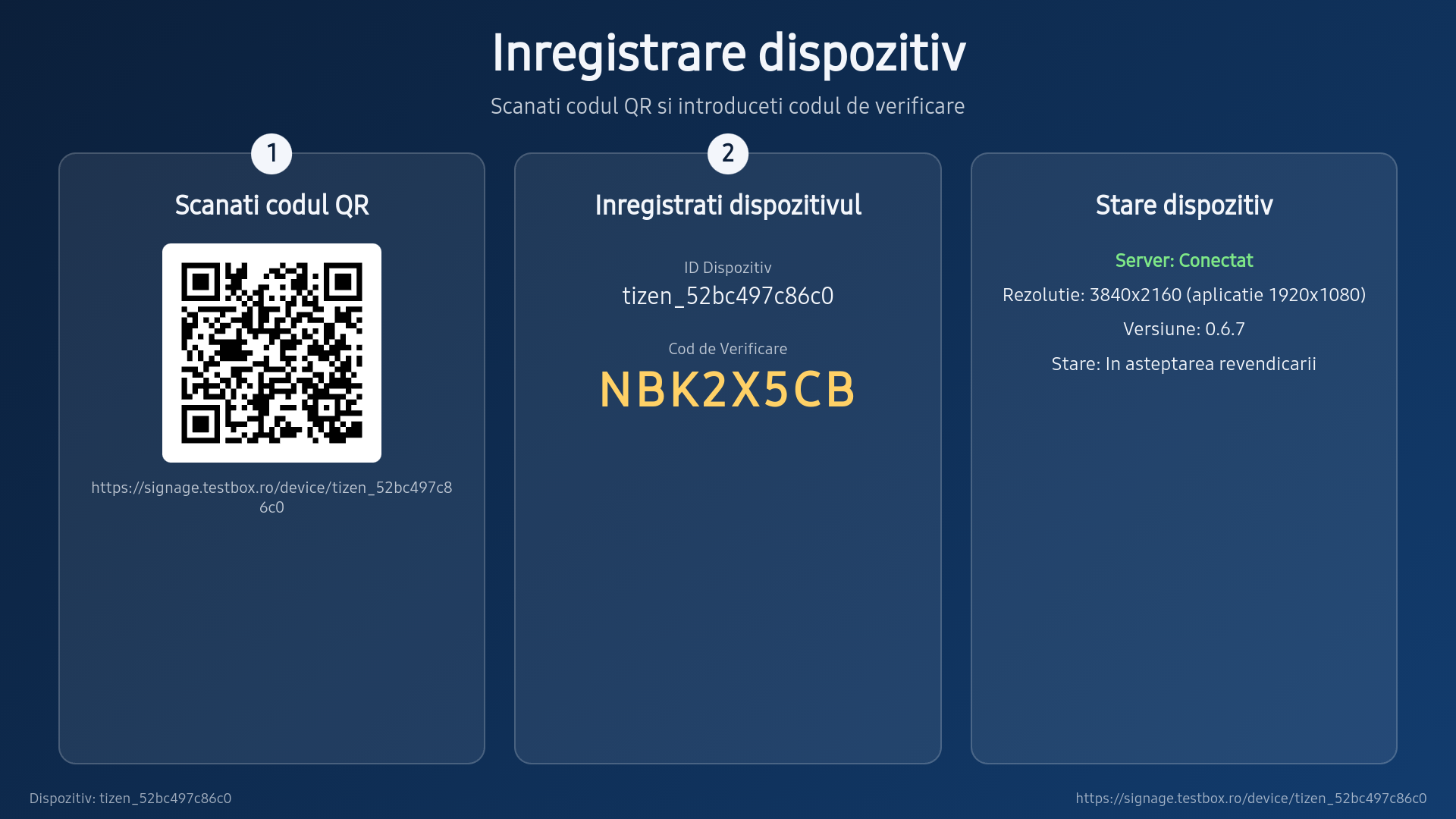
https://tizen.disphub.ro/ssspand restart the display. - On first start the display shows its device id and an 8-character code, together with a QR code that opens the DispHub portal.
- Log in on disphub.ro, add a display and type the code.
- Assign a licence to the display and upload your content.
- The display starts playing within a minute.
A display that is removed from the account goes back to the code screen and can be claimed again.
Screenshots

Contact
ELLIRIS SOLUTIONS S.R.L.Timișoara, Romania
E-mail: signage@disphub.ro
Web: https://disphub.ro
Privacy
The display sends the following to the DispHub servers:
- a device identifier derived from the display's hardware id, and the hardware id itself when the display is first registered;
- the display's model and firmware version;
- the app version and platform;
- its IP address;
- playback status, licence state, uptime, screen resolution, storage use and content version;
- error messages.
This report is sent about once an hour, over HTTPS; in between, the display checks in with the portal about once a minute and keeps a live connection open, sending only its identity. The app does not use a camera or microphone and collects no viewer data and no personal data. The content shown is the operator's own uploads; the operator is the data controller for that content. The data is kept for the operation of the service and deleted with the account.
DispHub pentru Samsung Smart Signage
Ce face DispHub
DispHub este un serviciu de digital signage pentru magazine și birouri. Operatorul încarcă imagini și clipuri video pe disphub.ro, ecranul le redă în buclă, inclusiv fără internet, iar portalul arată dacă ecranul este online și ce redă.
Această aplicație este playerul DispHub pentru ecranele Samsung Smart Signage (Tizen 6.5 și mai nou). Imaginile și clipurile sunt descărcate o singură dată și păstrate pe ecran; ecranul continuă redarea când rețeaua cade și reia sincronizarea când aceasta revine.
Cum se revendică un ecran
- Instalați aplicația din URL Launcher-ul ecranului: setați adresa URL Launcher la
https://tizen.disphub.ro/ssspși reporniți ecranul. - La prima pornire ecranul afișează ID-ul dispozitivului și un cod de 8 caractere, împreună cu un cod QR care deschide portalul DispHub.
- Autentificați-vă pe disphub.ro, adăugați un ecran și introduceți codul.
- Alocați o licență ecranului și încărcați conținutul.
- Ecranul începe redarea în cel mult un minut.
Un ecran șters din cont revine la ecranul cu codul și poate fi revendicat din nou.
Capturi de ecran
Capturile de ecran sunt cele din secțiunea în engleză: prima pornire (ID-ul dispozitivului, codul și codul QR) și redarea unei liste de redare pe un Samsung QM43C.
Contact
ELLIRIS SOLUTIONS S.R.L.Timișoara, România
E-mail: signage@disphub.ro
Web: https://disphub.ro
Confidențialitate
Ecranul trimite către serverele DispHub următoarele:
- un identificator al dispozitivului, derivat din ID-ul hardware al ecranului, și ID-ul hardware în sine la prima înregistrare;
- modelul și versiunea de firmware;
- versiunea aplicației și platforma;
- adresa IP;
- starea redării, starea licenței, timpul de funcționare, rezoluția ecranului, spațiul de stocare folosit și versiunea conținutului;
- mesajele de eroare.
Acest raport este trimis aproximativ o dată pe oră, prin HTTPS; între timp ecranul contactează portalul cam o dată pe minut și menține o conexiune deschisă, trimițând doar identitatea sa. Aplicația nu folosește camera sau microfonul și nu colectează date despre privitori și nici date personale. Conținutul afișat este cel încărcat de operator, care este operatorul de date pentru acest conținut. Datele sunt păstrate pentru funcționarea serviciului și șterse odată cu contul.